
Governance for external guest accounts
Companies using Microsoft Teams with external guests need strong governance to stay secure and compliant. Seamless helps IT and security teams to automate guest governance & lifecycle in Microsoft Teams, protecting corporate data from unwanted or outdated guest access.
 and internal security requirements
„With over 800 regularly changing officials, we rely on Seamless to automate our guest governance and to keep track of who, why, and where in Microsoft Teams access is granted.”
Marc Rauber, Head ICT Operations & Services SFV

Unleash the full potential of Seamless and enjoy these benefits:
Login to the Seamless admin center and instantly gain full overview and control over all of your guests at your fingertips.
Effortlessly identify inactive and outdated guests and assess their compliance with your policies. Swiftly block or remove access.
Establish patterns for display names, guest types and policies to meet your organizational standards.
Teams users are responsible for their guests, promoting efficient communication and adherence to your organization’s standards while ensuring guests get the necessary support.
Effortlessly determine to which Teams rooms guests have access to, allowing you to efficiently track and manage their presence within your organization’s collaboration environment.
Configure your policies for invitation, compliance, renewal and automated offboarding. The guest management is handled by the Teams users and automated with Seamless.
„In just two years with Microsoft Teams, our tenant has welcomed over 1’600 guests. Thanks to Seamless, identifying and removing inactive guests is a breeze!”
Patrick Huber, CIO Amstein + Walthert Group

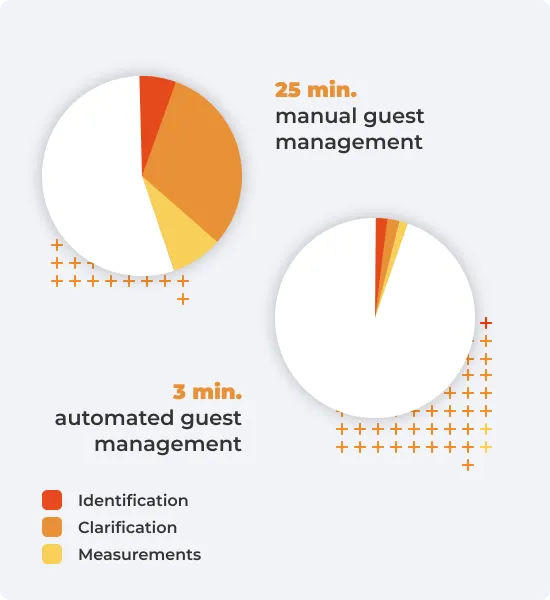
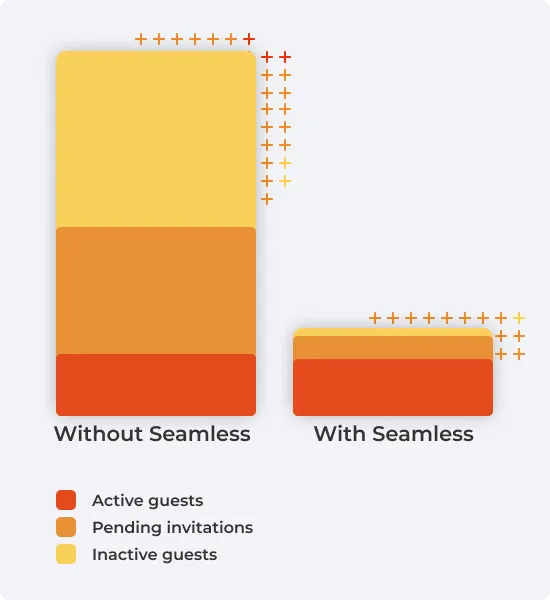
Without automated guest governance, administrators struggle to identify valid and non-compliant guest access. Seamless automates guest governance and transfers guest responsibilities to your Microsoft Teams users.
Teams users independently invite and oversee guests throughout collaborations, while your company’s governance is automatically enforced for all directory guests.
Administrators configure individual invitation flows that enforce the requirements that need to be fulfilled when Teams users invite guests for collaboration and give access to Teams.
Each guest is assigned to a sponsor. This ensures that the point of contact is always known, making communications and processes straightforward.
Regular renewals ensure that guests are automatically blocked or removed if access is not renewed by the sponsor.
After collaboration ends, guest access can linger, increasing the risk of accidental data sharing. Seamless mitigates this risk with the following features:
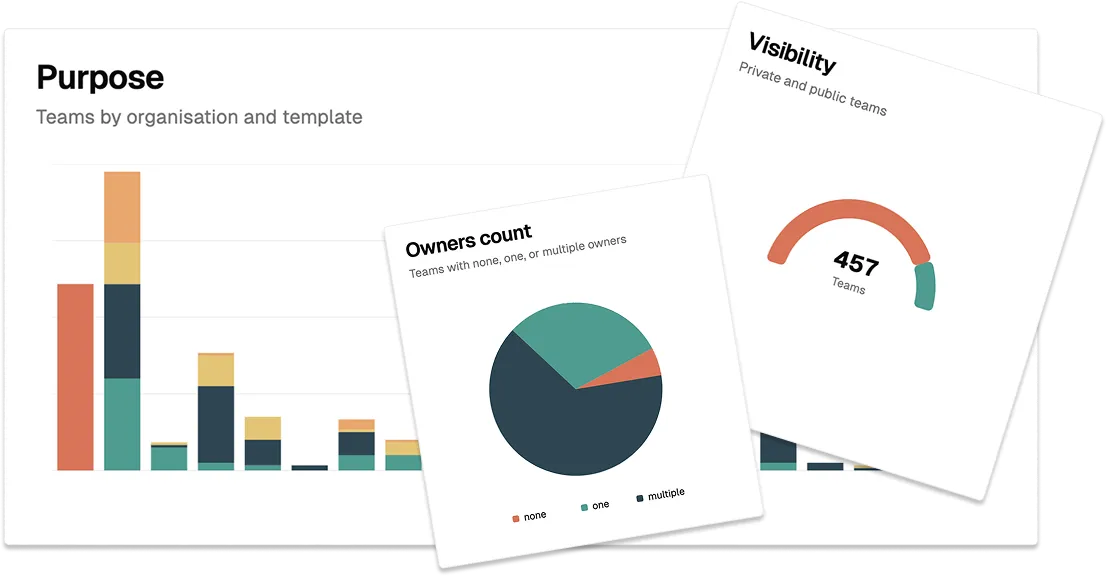
Administrators can see all guests and their status at a glance. Invalid, orphaned, or inactive guests, and their access, are cleaned up in no time.
Establish naming policies to maintain order in your Microsoft Entra ID. This simplifies administrative tasks and clarifies differentiation between internal identities and guests.
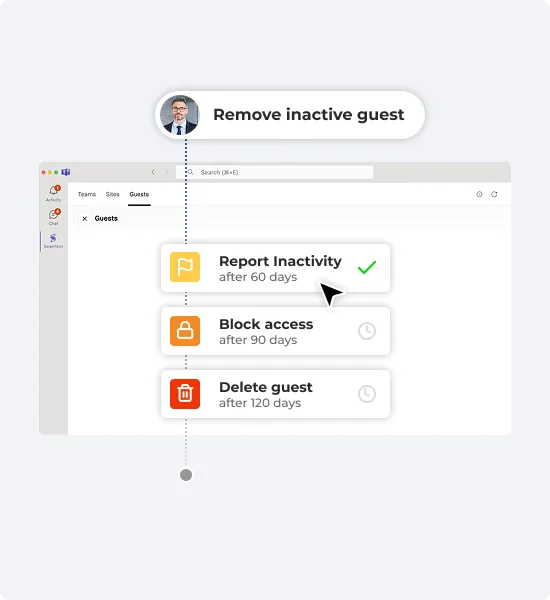
Daily compliance checks automatically report, block, or delete guests that are outdated, inactive, or do not meet your security and data compliance requirements.
„We do not allow contractors and visitors permanent access to our offices. So why do we still grant guests permanent access to data in Microsoft Teams?”
Michael Wellauer, ICT Operations & Engineering Hirslanden

Seamless keeps a watchful eye on your Microsoft 365 guests and automatically enforces your governance & lifecycle policies.
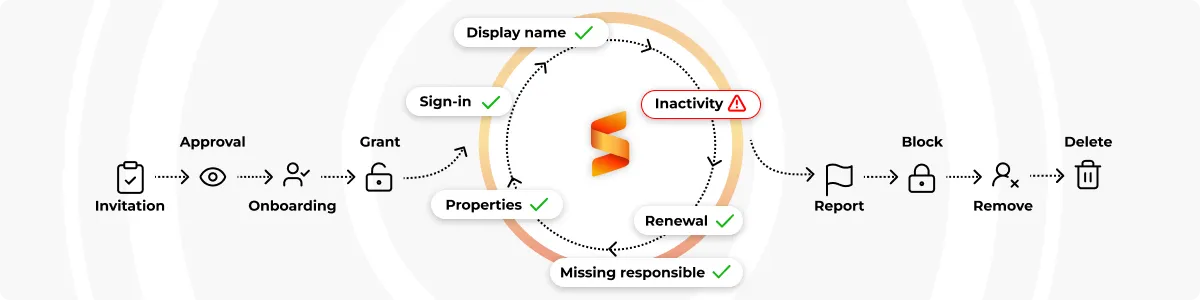
Set up recurring compliance checks to report, block, or remove inactive or non-compliant guests, ensuring security and data compliance automatically.
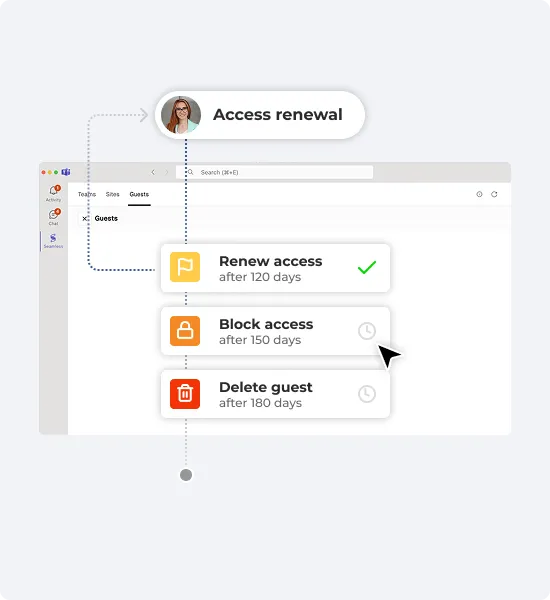
Use recurring access renewal checks to request verification of guest access from the responsible person and automatically revoke access if there is no response.
Seamless is available to all Microsoft 365 tenants, making it easy for IT Administrators to get started. Log in to the Seamless Admin Center for an instant overview of your governance status and get started effortlessly.
Test all Seamless features for 30 days for free.