

Oversharing has existed as long as SharePoint has. What used to be a latent risk slumbering in the depths of tenants has become acute overnight with Microsoft 365 Copilot. Anyone who rolls out Copilot today without first cleaning up permissions risks data protection violations, compliance issues, and reputational damage, without a single hacker being involved.
We also examine how to control oversharing across the entire lifecycle of workspaces and content in our article SharePoint Oversharing, Governance and Lifecycle in the Copilot Era.
What is Oversharing?
Oversharing means content is accessible to more people than necessary or intended. The cause is rarely malicious intent, but rather a mix of convenience, lack of knowledge about permission models, and grown structures that were never cleaned up.
Typical Manifestations
“Everyone except external users” sharing is the classic. A site or file is shared with the entire organization, even though it actually only concerns a specific team. In many tenants, this setting is still active by default and is rarely questioned.
Anonymous or “Anyone” links are sharing links that work without a login. “Anyone with the link” has access. That’s convenient for quick sharing, but as soon as such a link ends up somewhere, whether in a forwarded email, a chat, or an external service, the file is effectively public.
Inherited permissions from the past are a creeping problem. A site was opened up at some point for a project, the project has long since ended, the permissions have remained. Former members, external consultants, or interns still have access, even though they should have been removed long ago.
Misconfigured Teams or M365 Groups often arise through carelessness when creating them. A team is set up as “Public” instead of “Private”. The result: anyone in the tenant can join and view all content, without the owner even noticing.
Sensitive data in open areas is particularly tricky. Salary lists end up in the general HR folder, customer data in an open sales channel, contracts in a library with the innocuous name “General”. Because there is no consistent classification, no one notices.
Uncontrolled external sharing, finally, occurs when external partners are invited and never removed again. After a project ends, they remain in the site, often without the owner even knowing who still has access.
Why Copilot Changes Everything
Microsoft 365 Copilot works with the permission model of the signed-in user: what the user is allowed to see, Copilot also sees and uses as a source for answers. There is no separate Copilot permission.
Before Copilot, oversharing was mostly a theoretical risk. A wrongly shared salary list sat for years in some obscure site. Nobody searched for it, nobody found it. With Copilot, the question “What are our salary bands?” is now enough. Copilot searches the entire Microsoft Graph and delivers the answer including source citation and direct link.
What used to be security through obscurity is now actively surfaced. Copilot is a search engine with language understanding and finds even poorly named documents through their content.
Concrete Risk Scenarios
HR data: A salary overview has been sitting for two years in a site with “Everyone except external users”. Today, Copilot answers questions like “What does X earn?” with full source.
M&A and strategy: Confidential acquisition documents in an executive site with faulty inheritance. Copilot mentions the project in response to a question about ongoing strategic initiatives.
Layoff lists: HR list in a Teams channel that is unintentionally “Public”. Copilot answers “Who is being laid off?” including source.
Contracts: Sales employee asks about discounts for customer X. Copilot pulls in contracts from other customers because the contract library is not segmented.
GDPR: Application documents in an open HR site are quoted by Copilot. A classic violation with reporting obligation.
The Risks at a Glance
This is about more than uncomfortable moments: reportable data breaches under GDPR, loss of confidential strategic and personnel data, violations of the need-to-know principle and industry-specific regulations (FINMA, HIPAA, ISO 27001), reputational damage, and not least insider risks, because former or disgruntled employees find things they shouldn’t find.
Important: oversharing is not a hack, but a homemade governance problem. That’s exactly why it gets overlooked. There is no alarm, no suspicious login, no malware. The data is simply visible to too many people. Until someone finds it.
Microsoft’s Brakes: Useful, but No Substitute for Governance
Microsoft has recognized the problem and provided several tools:
Restricted SharePoint Search (RSS) temporarily limits Copilot to a whitelist of max. 100 sites. Good as a transition, but no permanent solution.
Restricted Content Discovery (RCD) excludes sensitive sites from Copilot on a per-site basis without blocking direct access.
Sensitivity labels with encryption prevent Copilot from processing protected content. The prerequisite is consistent classification.
DLP for Copilot in Microsoft Purview allows rules such as “Copilot may not use content labeled ‘Highly confidential’ for answer generation”.
These tools help, but they don’t replace real permission hygiene. They are a band-aid, the wound remains.
The Uncomfortable Truth
Copilot doesn’t create the oversharing problem. It makes it visible. Many organizations realize during the rollout: “We don’t have a Copilot problem, we have a 10-year SharePoint problem that we never cleaned up.” Copilot is in this sense also a trigger for long-overdue governance work.
How Seamless Solves the Problem at the Root
Instead of repairing oversharing after the fact, Seamless ensures that it doesn’t arise in the first place and that existing problems are systematically resolved.
Sharing options are defined in central templates: public or private, guest access allowed or not. The most common cause of oversharing is thus eliminated at the time of configuration.
Sensitivity labels are set automatically during provisioning. If a label is subsequently changed by the owner, a background job flags the affected workspace.
A compliance job continuously checks whether groups are public even though the template defines them as private. Drift becomes visible and fixable.
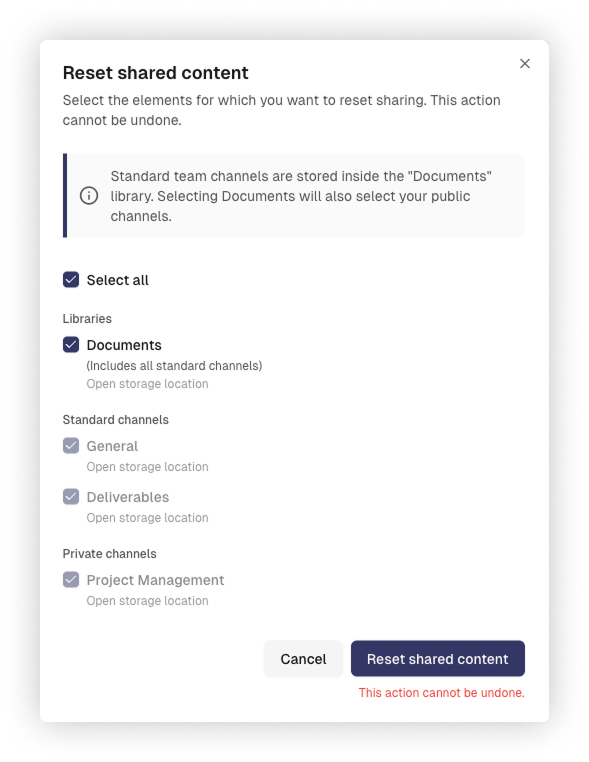
Shared content can be specifically reset with “Reset shared content”. Owners select per workspace which libraries, standard channels, or notebooks should be cleaned up. Existing sharing links and permissions are removed in a single step.
Consistent ownership principle: every team and every guest access has a clear owner who is responsible for content.
Guest access controlled across the entire lifecycle: from invitation through approval to automatic removal. Guests are automatically removed if they haven’t logged in for a long time, never accepted the invitation, or were not confirmed by the owner during review. This way, external permissions never remain longer than necessary. What well-regulated guest access in Microsoft Teams and SharePoint looks like in detail, we cover in our article Well-regulated Guest Access in Microsoft Teams & SharePoint.
Periodic reviews are mandatory: groups and guest access are regularly reviewed by the responsible person. This prevents external permissions from being “forgotten”.
Conclusion
Oversharing is a governance problem, not a technical one. Microsoft 365 Copilot did not create it, but exposed it mercilessly. The good news: with clear structures, automated controls, and consistent responsibilities, as Seamless provides them, the problem can be systematically contained. Those who act now turn the Copilot rollout into the occasion that finally puts their Microsoft 365 on solid footing.