

Efficient collaboration in Microsoft Teams is more important than ever for many companies. A key factor for more clarity and fewer mistakes is the clear identification of guests. With naming policies, external and internal members can be easily distinguished.
In this article, we show why consistent names for guests are essential, which challenges they solve, and how Seamless enforces them.
Why clear naming policies for guests matter
1. Structure in Entra ID
For IT administrators, a clear and consistent representation of guest access in Entra ID is crucial to maintain control and order.
A naming policy enables:
- easy filtering and sorting
- better visibility and control over external identities
- clear and uniform structures in Entra ID
Companies with many external partners particularly benefit from significantly improved organization and faster orientation.
2. Avoid mistakes when sharing
A clear distinction between internal and external guests prevents mistakes such as accidentally sharing sensitive information with the wrong person.
In Microsoft 365, users often find it difficult to see whether someone is external or internal. This quickly leads to uncertainty—especially when choosing the correct contact while sharing files or starting a conversation in Microsoft Teams.
One reason for this is the fact that different Microsoft 365 services rely on different identity types:
- Microsoft Teams chats often use the SIP protocol, which is based on a guest’s email address
- SharePoint, OneDrive, Viva Engage and other services rely on the directory identity
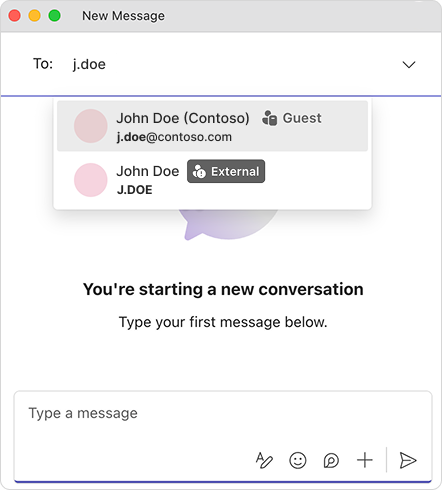
If names and display names are not consistent, inconsistencies appear. For users, it often seems as if multiple versions of the same person exist — and they often fail to recognize that the person is actually an external guest.
The challenge: Microsoft overwrites the display name
In Microsoft 365, it is common for a guest’s display name to be overwritten automatically.
This happens because Microsoft pulls user attributes from the guest’s home tenant during the first login.
So even if a guest is cleanly and correctly recorded in Entra ID, these values may be overwritten by data coming from the external tenant — and the defined naming policy is lost.
The consequences:
- inconsistent naming formats
- loss of the enforced naming convention
- more difficult guest management in Microsoft 365
IT administrators can update display names manually, but this is time‑consuming, error‑prone and not scalable in large environments.
The solution: Enforce naming policies automatically
Seamless solves this challenge with an automated compliance job that reliably monitors and enforces naming conventions in Entra ID. This keeps guest management in Microsoft 365 clean and consistent at all times.
Here’s how it works:
- Individual naming policies can be defined for each guest template.
- Compliance checks regularly validate every guest against the defined naming policy.
- If a display name is overwritten or inconsistent, Seamless automatically restores the correct value.
- If the naming policy changes, Seamless immediately updates all affected guests.
This automation ensures that naming conventions in Microsoft 365 are always enforced — regardless of which data is stored in the guest’s home tenant.
Best practices for naming conventions
Based on our experience, the following naming pattern has clearly proven itself:
First name Last name (Company)
This format is:
- easy to read
- clearly understandable
- immediately identifiable
It is important to use full first and last names, as abbreviations are less transparent and more likely to cause confusion.
With full names, the person’s identity remains clear and immediately recognizable within the organization.
The company name provides quick additional context — especially in environments with many external partners or projects.
Conclusion: Consistent guest names improve collaboration
Clear and consistent naming policies are an essential building block for secure and efficient collaboration with external guests in Microsoft Teams. They reduce confusion, prevent mistakes when sharing, and ensure that external identities in Entra ID remain transparent and traceable at all times.
With Seamless, naming policies can not only be defined but also reliably enforced on an ongoing basis. This gives companies clean guest management, less manual effort and significantly more visibility across the entire Microsoft 365 tenant.
Organizations that want to simplify collaboration with external partners while reducing security risks should make naming policies a fixed part of their governance strategy — and Seamless allows them to start immediately.