

Companies today collaborate more intensively than ever with external partners, suppliers, and customers. In Microsoft Teams and Microsoft 365, this exchange typically happens through guest accounts created in the organization’s Entra ID environment. But the more external users are added, the harder it becomes to maintain visibility over access, risks, and responsibilities.
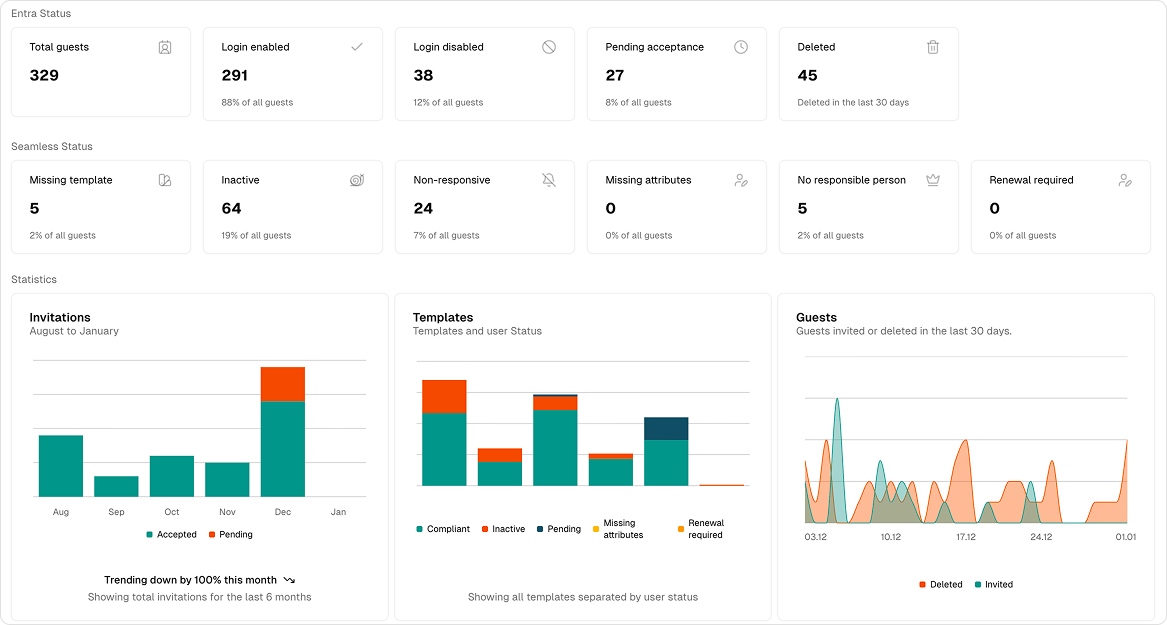
The following Guest Dashboard from the Seamless Admin Center illustrates how important a clear, consolidated view of all guests is.
Seamless Guest Dashboard
Without central monitoring, administrators must switch between Entra ID, Teams, Microsoft 365 Groups, SharePoint, and various logs. This leads to typical issues:
- inactive or forgotten guest accounts and access
- missing responsibilities
- open invitations that were never accepted
- guests with incomplete data
- lack of transparency and governance
The risk: unauthorized access, compliance violations, and security gaps.
A structured dashboard solves these challenges.
What the Dashboard Shows – and Why These Metrics Matter
The dashboard immediately provides a complete overview of external guests in Microsoft 365.
1. Status in Entra ID – The Foundation of All Guest Accounts
In the example dashboard:
- 329 Total guests
- 291 Login enabled (88%)
- 38 Login disabled (12%)
- 27 Pending invitation acceptance (8%)
- 45 Deleted (last 30 days)
Why this is relevant
Active, never-confirmed, or disabled logins are classic weak points in guest access. This overview instantly highlights where risks exist and where action is needed.
2. Status in Seamless – Governance Status & Security at a Glance
- 5 Without template
- 64 Inactive (19%)
- 24 Invitation not accepted in time (7%)
- 0 Missing guest information
- 5 No responsible person (2%)
- 0 Renewal pending
Why this is relevant
- Inactive guests pose unnecessary security risks
- Missing responsible persons indicate lack of control
- Template deviations create compliance issues
With these insights, Microsoft 365 administrators can act quickly and effectively.
3. Statistics – Identify Trends and Risks Instantly
The lower section of the dashboard displays three key charts:
-
Invitations (August to January)
Shows accepted and still-open invitations — including trend (“Trending down by 100% this month”).
Value: Organizations instantly see whether external collaboration is rising, stagnating, or declining. -
Templates & Compliance Status
Provides an overview of different templates and the status of guests created with them.
Value: Identifies structural governance gaps. -
Guest activity over the last 30 days
Shows invited and deleted guests over time.
Value: Highlights patterns, peaks, or potentially unusual activity.
Why a Dashboard Is So Valuable
A guest-focused dashboard enables Microsoft 365 administrators to achieve:
✔️ Faster decisions
Risks become visible immediately — without switching between tools.
✔️ Higher security
Unnecessary or risky guests stand out right away.
✔️ Improved governance
Responsibilities, inactivity, and missing data are instantly identifiable.
✔️ Less manual effort
No Excel, no digging through logs — everything live, everything in one place.
Conclusion: Guest Management in Microsoft 365 Doesn’t Have to Be a Black Box
The Seamless Dashboard demonstrates how valuable a clear and complete overview of all guests in Microsoft 365 can be. With a consolidated view of the most important information, risks become easier to detect, access can be better controlled, and compliance requirements are easier to meet.
The combination of Entra ID Status, Seamless Status, and Trends provides a 360-degree view of all external guests and their status — a critical foundation for compliant and efficient collaboration.